
Adding a new kiosk for accepting payments.
To create a new kiosk, go to Settings – Directories – Directories – Kiosks, then use the "Add" button, you need to fill in the fields, the values of which are described under the screenshot.
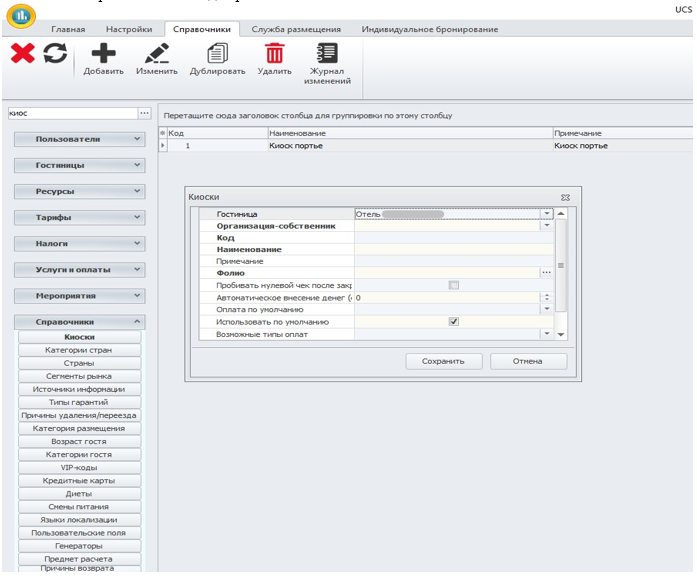
Field values:
Hotel – the kiosk belongs to the hotel.
Owner organization – the kiosk's affiliation to the owner organization.
The code is a short name.
Name – full name (for example, “Cash register").
Note – a field for additional information.
Folio is a folio number that is filled in manually (the kiosk code is written in order, starting with the preset number 501 in the system, i.e. Kiosk No. 1 with folio No. 501, Kiosk No. 2 will be with folio No. 502, etc.).
Punching a zero check after closing is an option that automatically punches a zero check after closing a shift (after punching a zero check, the next shift opens).
Automatic deposit of money (amount) – the amount that will be automatically deposited to the cashier (the deposit is also carried out in the "Work with the cashier" module).
Default payment is the payment type that will be used by default.
Use by Default is the option by which the kiosk will be used by default.
Possible payment types are the types of payments that will be used at this kiosk (if all are used, then it is not necessary to check all the boxes).
The list of available users is the users who have access to the kiosk (if the kiosk is available to all users, then there is no need to check all the boxes).