
Individual relocation (relocation).
Used for:
1. Rate changes within the same stay,
2. Changing the number of Guests within the same stay,
3. Room number changes within the same stay.
Ways to move to another room:
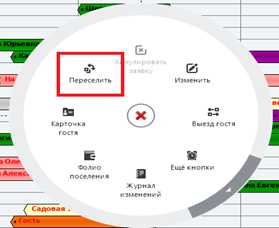
1) The "Resettle" command in the context menu of the settlement.
2) Dragging the location on the checkerboard.
3) A button on the control panel.

In the "Individual booking" window, specify the new type and number of the room, the tariff for calculating the cost of accommodation. Save the data.
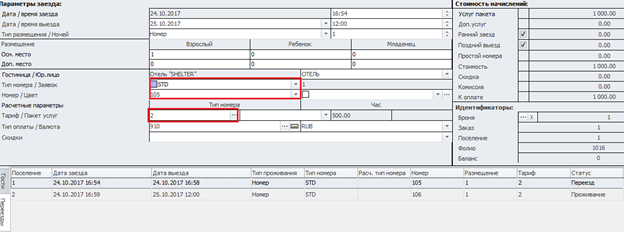
Relocation of a guest with a change in the room type and the preservation of the tariff
In a situation where it is necessary to move a guest to a different type of room, but at the same time keep the same rate, use the "Calculated parameters" field. To activate it, click on the label: "Room type", opposite. Select the number type to calculate the fare under the button. Set a pricing plan.
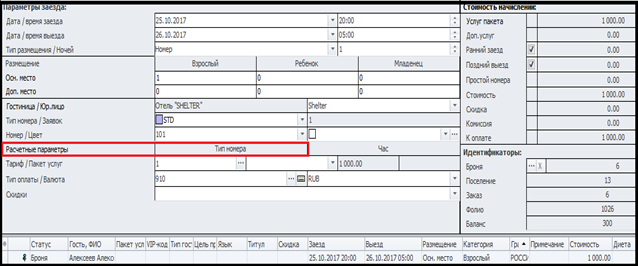
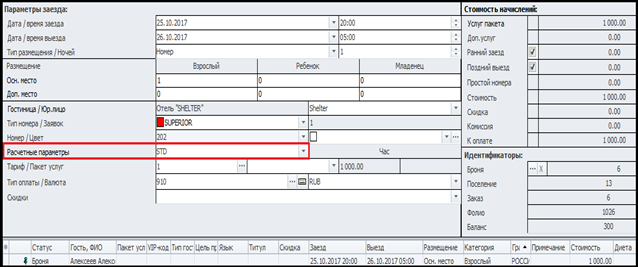
The planned relocation function.
The function is used in cases when it is necessary to schedule a move for one of the days during the guest's stay when booking or checking in.
The second option, when the planned move can be used, is to change the fare during the stay. In this case, the transfer is carried out to the same room, but a new fare type is selected.
In the "Individual Booking" window, select the guest who needs to add a transfer, then open the context menu and select the "Add transfer" function. The "Relocations" tab opens automatically, which creates a record of the guest's move to another room in the form of a new line.
Specify the check-in date for the new room type (the check-out date must be equal to the total check-out date indicated on the settlement card). Set the room type, room number, type of accommodation, and rate. Save the data.
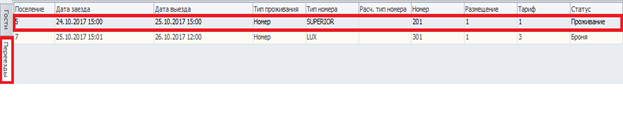
The program will create a new armor for moving, the beginning of such a location will be interrupted.:

On the day of the move, at the time of the guest's relocation, it is necessary to select the location of the PCM and select the "Relocate" option from the context menu.:
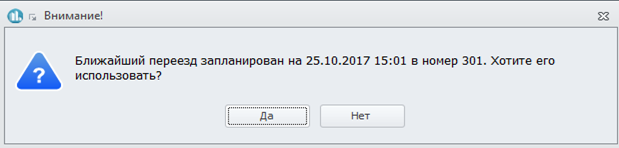
The program will display a warning window about the planned move. Use the "Yes" button:
In the "Individual Booking" window that opens, check the correctness of the information and save the relocation.